Skip to content

AI-native LMS · open source

Built from your docs in minutes. Kept in sync with every change.

ULAMS builds a cited course from your material in minutes. When a document changes, it proposes the update and ships a new course version once you approve it.

Your material

Start from the material you already have

Upload documents or connect Notion, Google Drive or Git; a Confluence space comes in as an export. ULAMS splits everything into short passages it can quote.

Why it matters

No blank page and no copy-and-paste: experts keep writing where they already do, and the course is built from that.

Builder chat

Answer a few questions in a chat

The builder asks who the course is for, their starting level, the length and whether you need versions. Your answers become the course brief.

Why it matters

A few answers replace a briefing meeting and a template.

Your brand

Your design system, your academy

Import colours, fonts and logo from a DESIGN.md, a Figma file or a brand guide. You approve the theme as a diff, and each academy runs white-label on its own subdomain.

Why it matters

Training looks like your company, and every colour is checked for WCAG 2.2 AA contrast before it is saved.

Course blocks

A full course: modules, lessons and blocks

Modules group the lessons. Each lesson is standard text with cited passages, plus interactive blocks: quizzes, drag and drop, image hotspots, dialog cards, video and code exercises. The course ends with a final test and a certificate.

Why it matters

Your team edits a sourced draft instead of starting from zero, and reviewers check each statement against its passage.

Your review

You stay in control

Every AI change arrives as a diff with the passage behind it. Approve a lesson in one go, reject a block, or ask for an alternative, such as a diagram instead of a quiz.

Why it matters

Nothing is published without your approval, and the audit trail records who approved what and when.

Learners

A version per role, each in its own academy

Draft a version for each role or level from the same sources, and publish each in its own academy on its own subdomain, with its own branding. Keeping the versions linked across academies is coming.

Why it matters

Support, sales and partners each get training that fits them, without writing three courses.

Analytics

Evidence for managers and auditors

Every block reports its own results: who read the text, who got the quiz right, how many tries the drag and drop took. Per course you see who is stuck, who finished and who still owes mandatory training, with an audit export.

Why it matters

You see which block to fix, not just which course, and the data stays in your own deployment.

Updates

When your documents change, the course follows

When a document changes, ULAMS finds the passage, proposes an update for the lessons and questions that quote it and, once you approve, publishes a new version of the course. Learners see what changed and keep their progress.

Why it matters

You review the few lessons a change touches instead of re-checking the whole course.

Then the loop starts againLearner insights show which sections confuse people and turn them into an improvement proposal you review like any other change.

why ulams

What your team gets

  • Courses in minutes, not months

    One measured run: 6 lessons and 18 quiz questions in 7 min 44 s for USD 0.28. By hand, an hour of e-learning takes 49–716 hours.

    Time and cost
  • Every claim cited, always current

    Each block links to its source. When a source changes, ULAMS flags the lessons it touches and proposes an update for your review.

    See real runs
  • Courses people practise in

    Quizzes, self-test cards, worked examples, drag and drop, image hotspots, simulations and code exercises. AI generates the quizzes, cards, examples and H5P activities from your sources, and you review each one.

    Learning elements
  • Your brand, white-label

    Your design system becomes the theme, checked for WCAG 2.2 AA contrast. A subdomain, certificates and SSO per academy.

    Style guide
  • Evidence for compliance

    See who is stuck, who finished and who still owes mandatory training. Certificates, due dates and audit export.

    Reporting
  • No lock-in

    MIT licensed, on your servers. SCORM, cmi5, xAPI with a built-in LRS, LTI 1.3 and a REST API.

    Self-host

The builder asks, you get a course

Answer a few questions. Review. Publish.

The real Course Builder, screen by screen, from two recorded runs. Next to each screen: the questions it asks, in plain words, and what you decide.

  1. Step 1 of 9

    Point it at the material you already have

    The builder asks

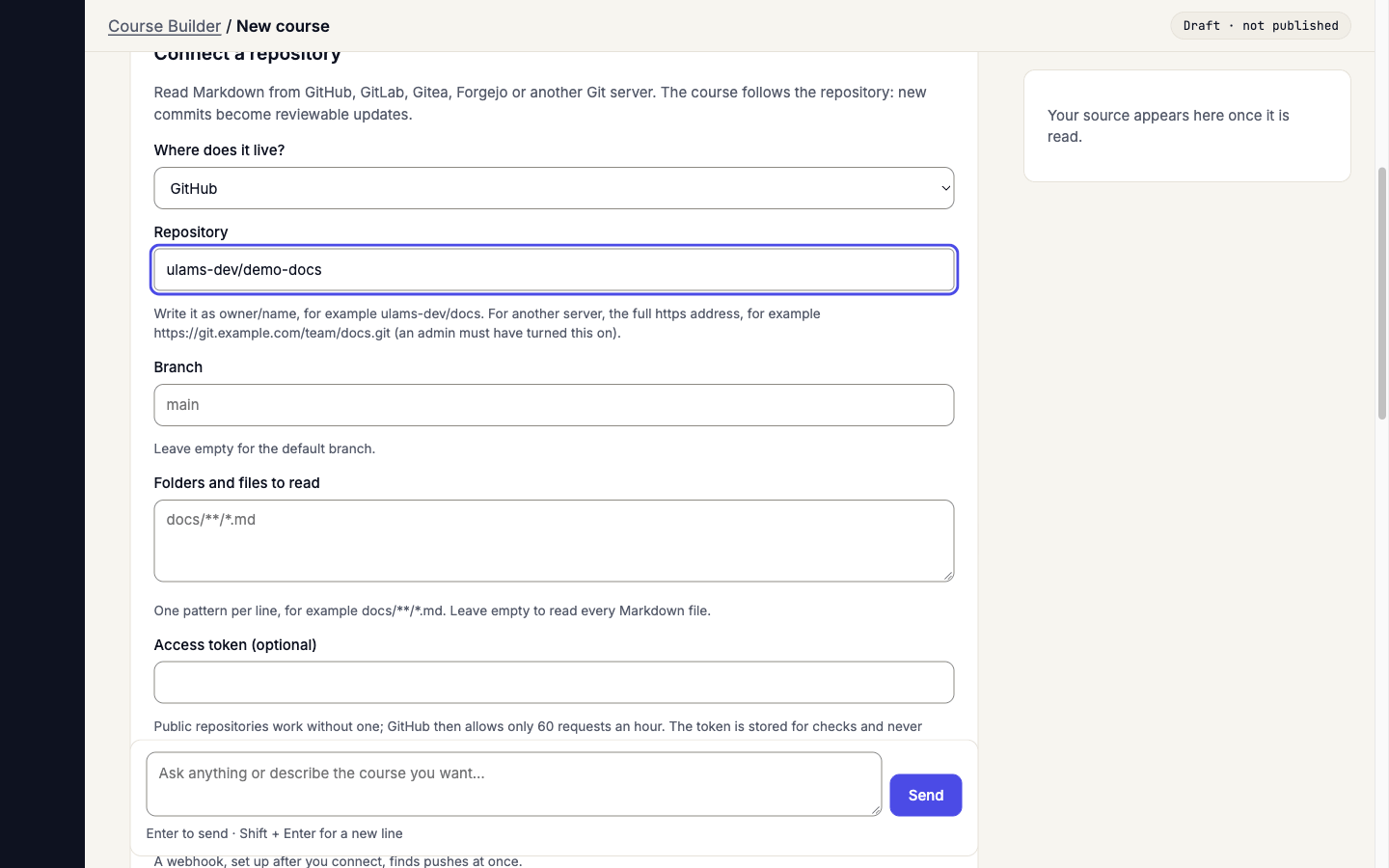
    • Where does the material live? A GitHub repository, Google Drive or Notion, or an uploaded PDF, Word or Markdown file.
    • Which repository and branch? A public repository needs no access token.

    What you decide

    The builder reads the source first and splits it into short passages it can cite: 13 in this run. Uploaded content is treated as data, never as instructions.

    Course Builder, Connect a repository: GitHub selected, the repository ulams-dev/demo-docs, the default branch and an empty access-token field.
    Screen from the docs-repository runNew course, Connect a repository: GitHub, the repository ulams-dev/demo-docs, the default branch and no access token, because the repository is public.
  2. Step 2 of 9

    Who it is for, at what level, for how long

    The builder asks

    • Who is this course for?
    • What is the starting level of your learners?
    • How long should the whole course take, and how long is one lesson?

    What you decide

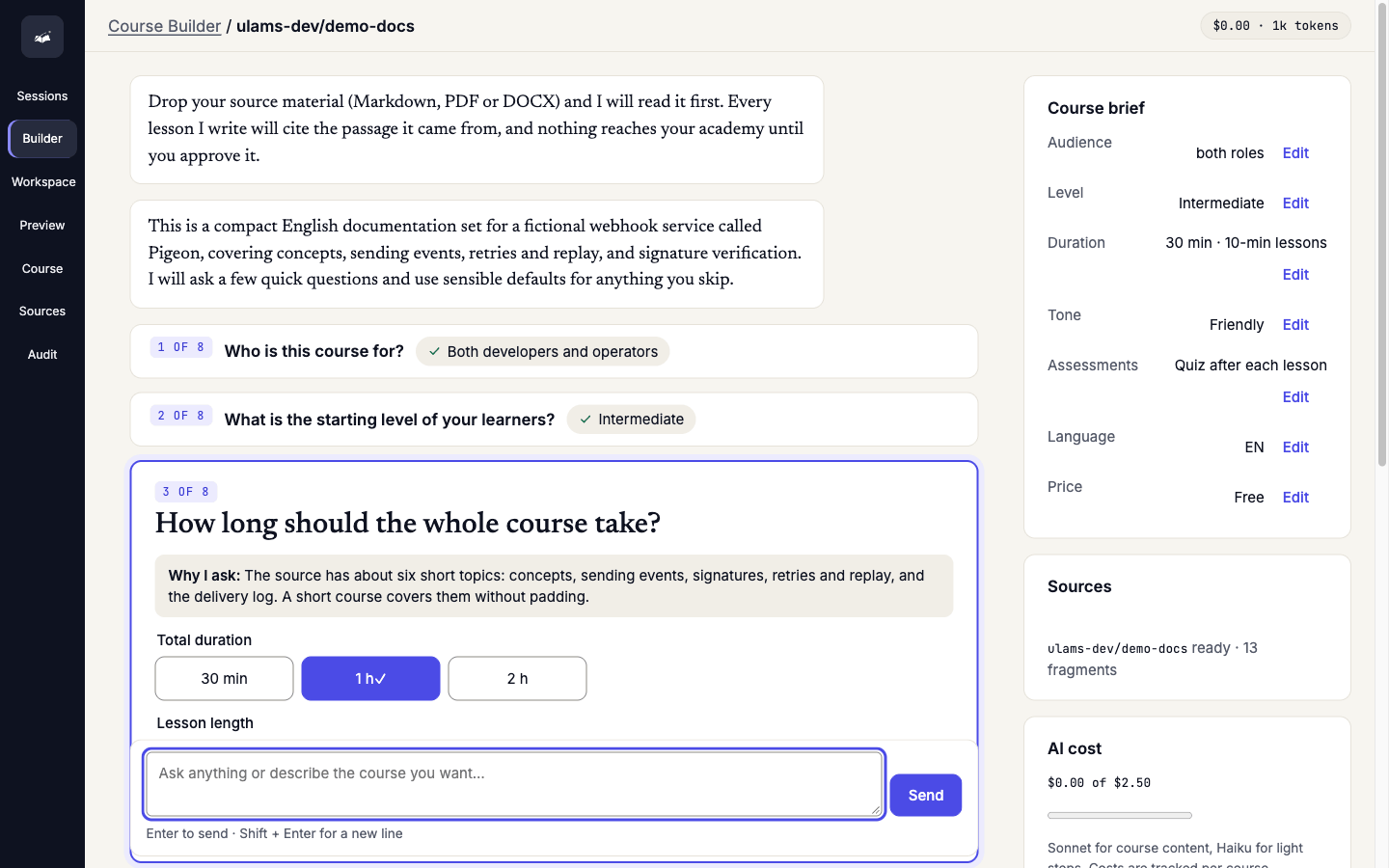
    Each question says why it is asked, based on what the source contains, and offers a default. Skip one and the default is used. Every answer goes into the course brief, where you can edit it later.

    The interview, question 3 of 8: how long should the whole course take, with 30 min, 1 h and 2 h options and a Why I ask note. The course brief on the right shows both roles and Intermediate.
    Screen from the docs-repository runThe interview starts from what the repository contains. Question 3 of 8 asks how long the course should take. The first two answers, both roles and intermediate, are already in the brief on the right.
  3. Step 3 of 9

    Tone, testing and language

    The builder asks

    • What tone should the course have? Friendly, professional, playful or academic.
    • Should learners be tested? A quiz after each lesson, a final test, or both.
    • In which language should the course be written?

    What you decide

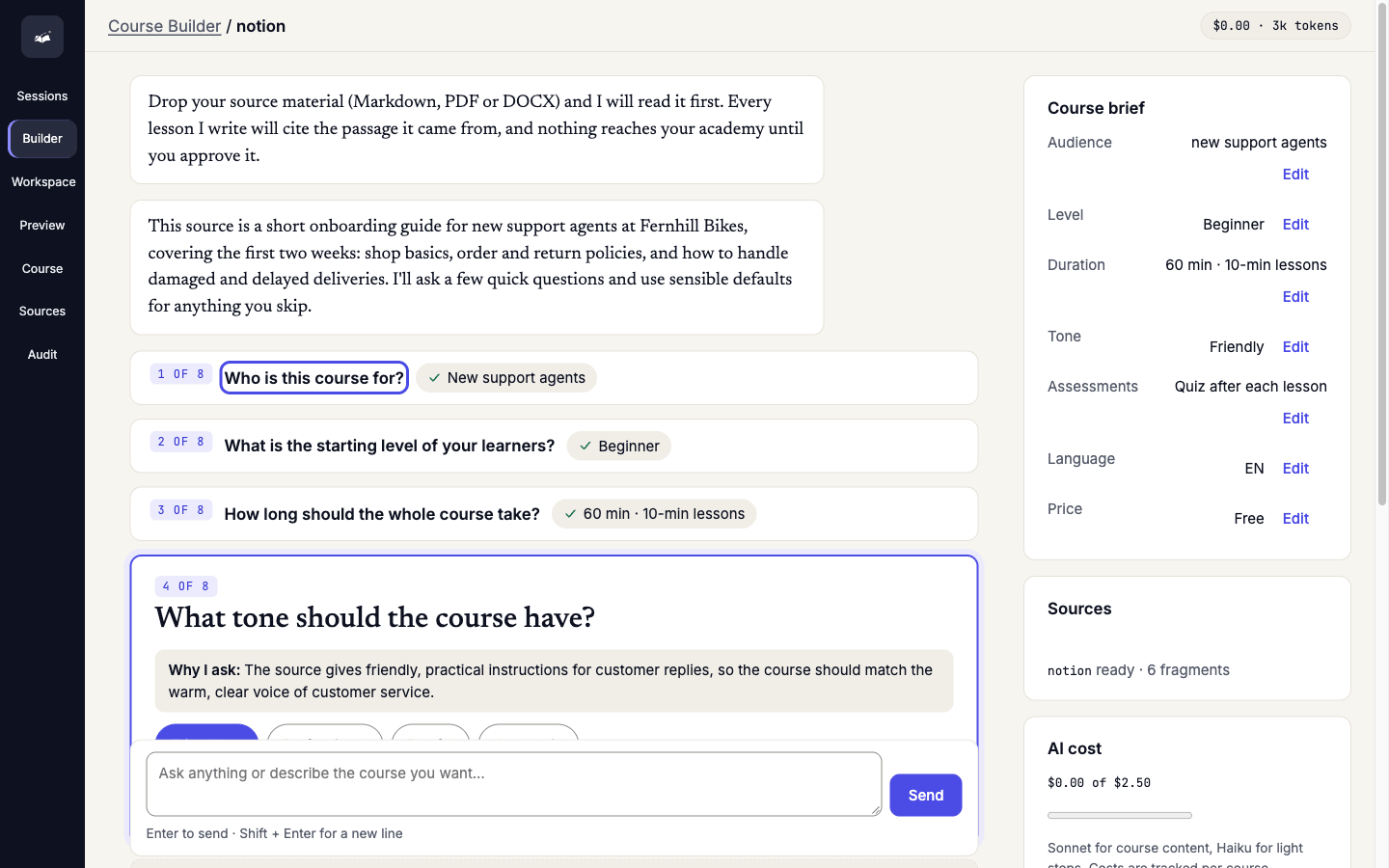
    The builder suggests a tone from the source itself: a friendly onboarding guide gets a friendly course. You keep the last word.

    The interview, question 4 of 8: what tone should the course have, with a Why I ask note about the warm voice of customer service. The brief shows new support agents, Beginner and 60 minutes.
    Screen from the Notion-page runQuestion 4 of 8 asks for the tone. The earlier answers, new support agents, beginner and 60 minutes in 10-minute lessons, are already in the brief on the right.
  4. Step 4 of 9

    Versions by level or role, price and look

    The builder asks

    • Who else is this course for? One course for everyone, or extra versions for beginner, intermediate or expert learners, or for named roles.
    • Will the course be free or paid?
    • Which look should the site have? Asked when you may change the theme.

    What you decide

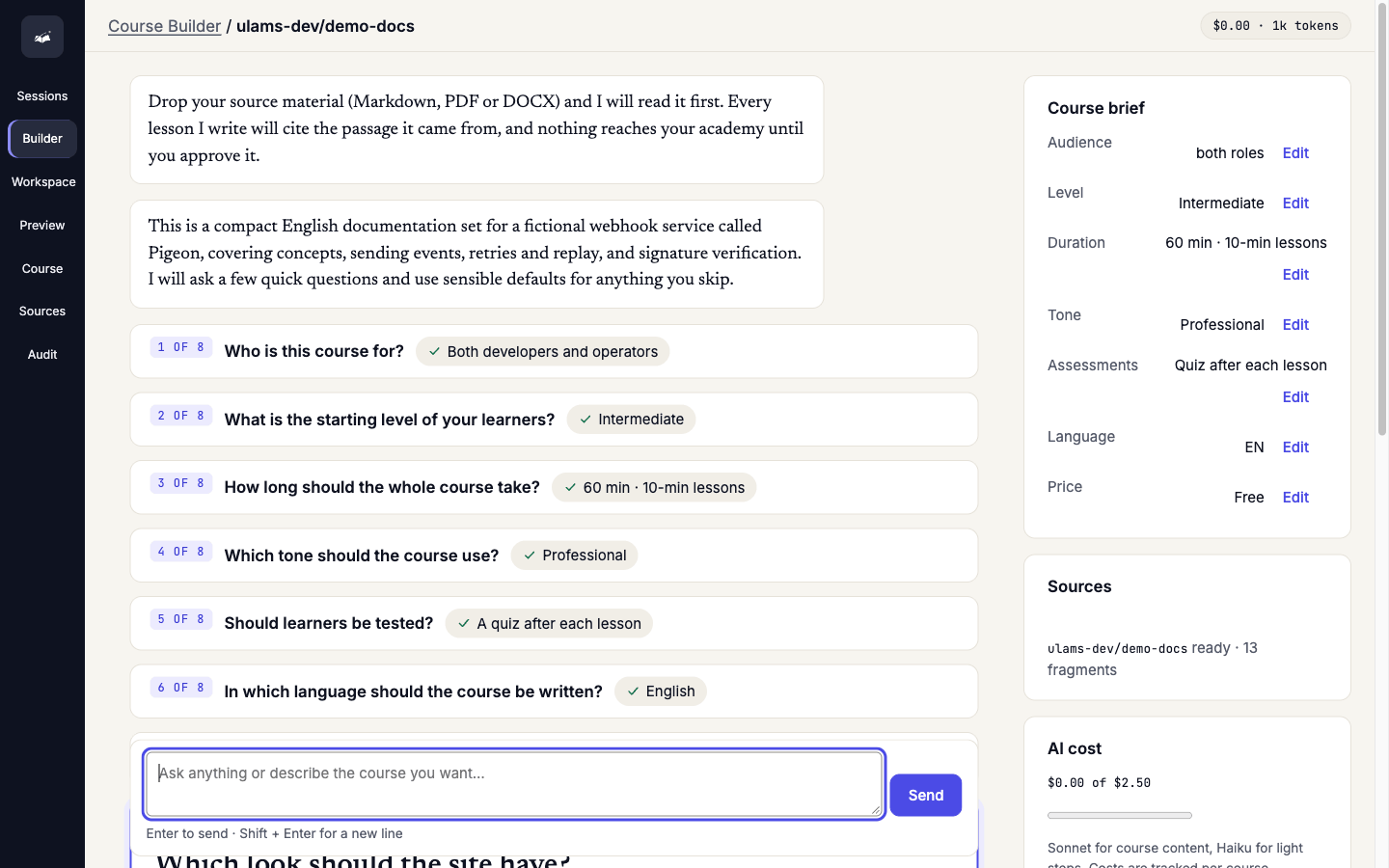
    The course you approve first is the base. Each extra level or role gets its own version from the same sources, every block cited, and you review it as a list of changes against the base.

    Six of eight questions answered: both developers and operators, intermediate, 60 minutes in 10-minute lessons, professional, a quiz after each lesson, English. The brief on the right is filled in.
    Screen from the docs-repository runSix answers are in and the last question is about the look of the site. The brief on the right fills in as the author answers.
  5. Step 5 of 9

    Approve the outline before anything is written

    The builder asks

    • Approve outline and generate, or request changes with a comment.

    What you decide

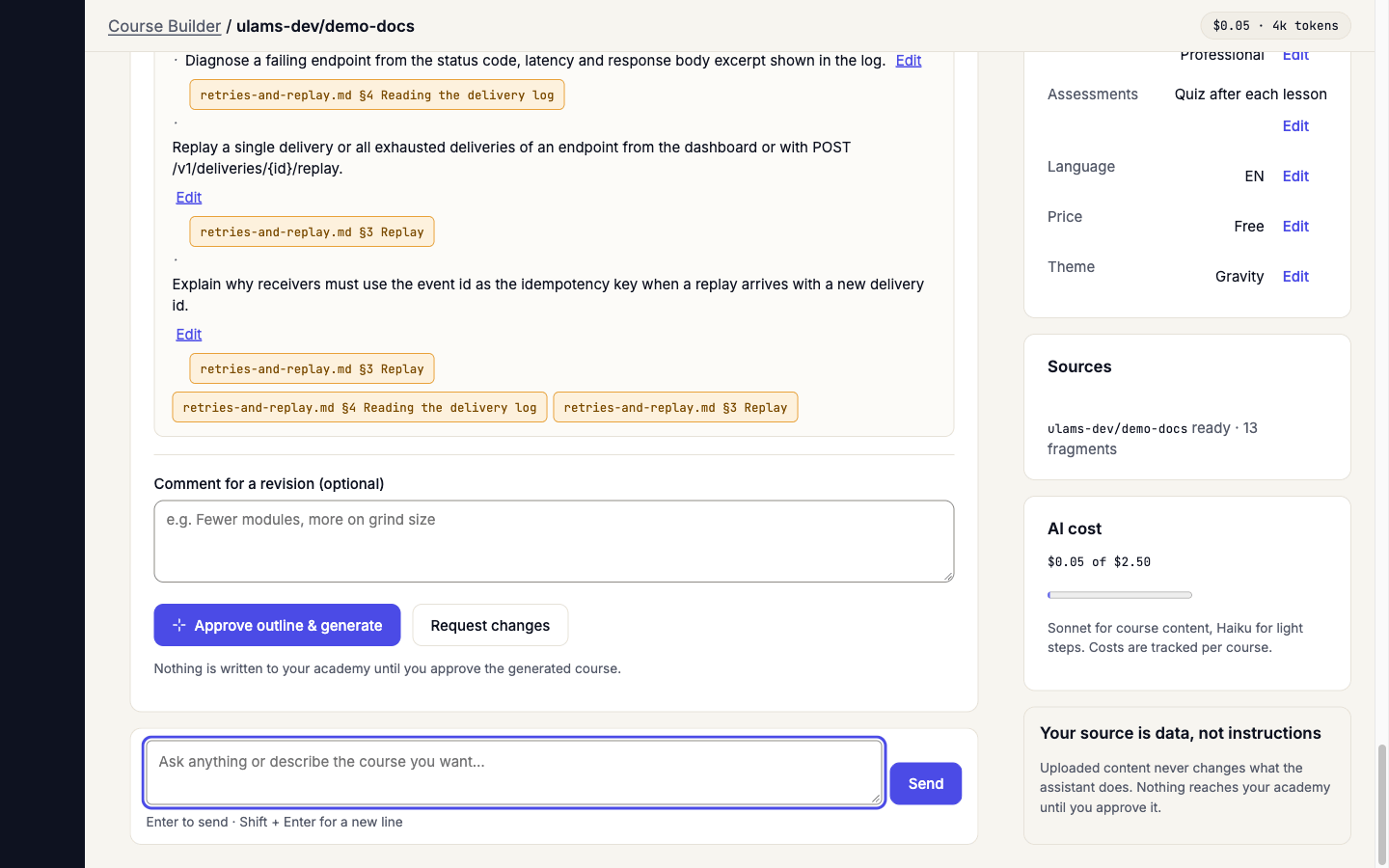
    Every learning objective shows the source passage it will cite. Nothing reaches your academy until you approve the generated course.

    The end of the proposed outline: learning objectives with citation chips such as retries-and-replay.md §3 Replay, a comment field, and the Approve outline & generate and Request changes buttons.
    Screen from the docs-repository runThe proposed outline ends here: six lessons, each with the source passages it will cite. The README was left out. Writing starts only after Approve outline & generate.
  6. Step 6 of 9

    Watch it write, with the cost in view

    What you decide

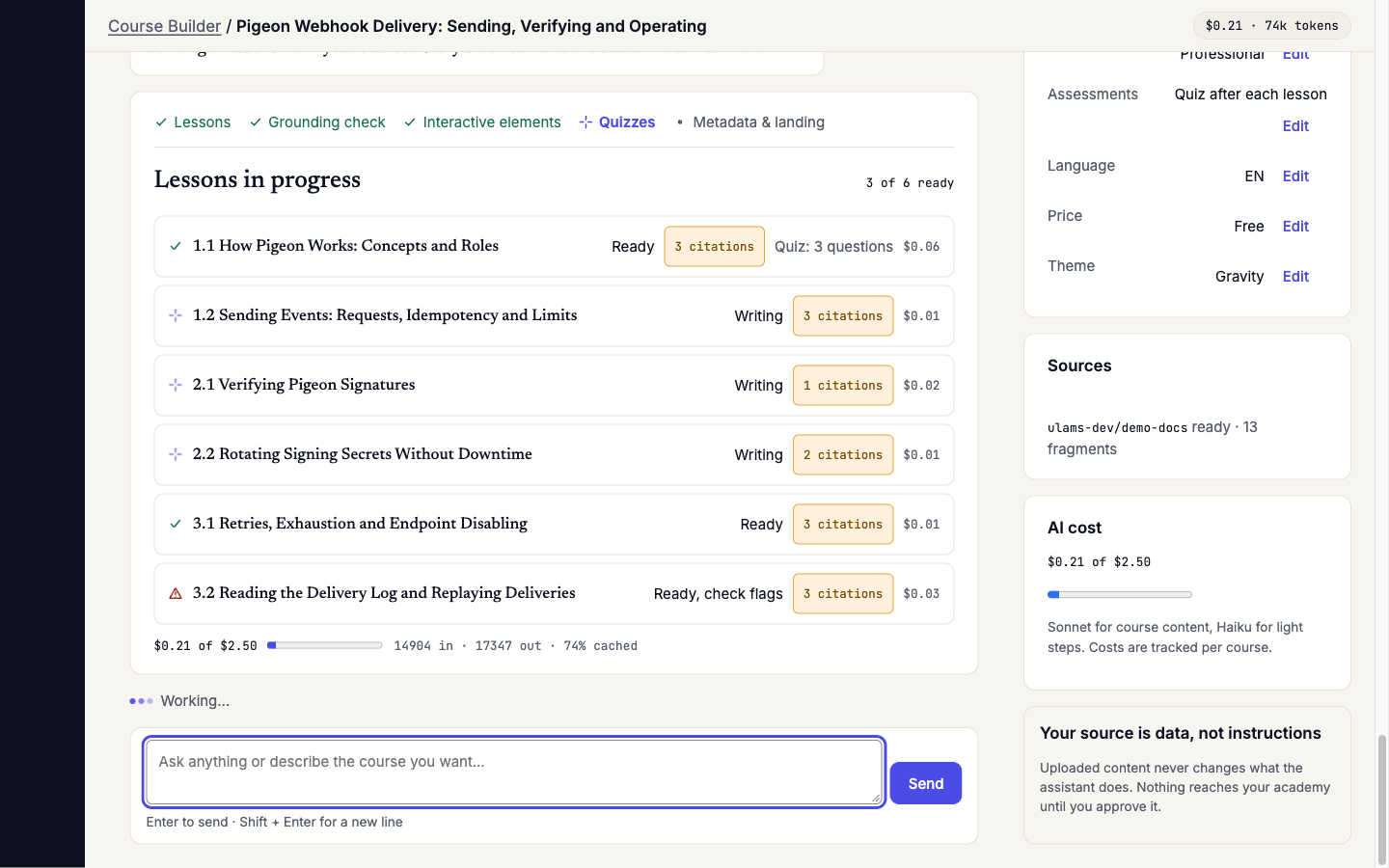
    Lessons, a grounding check, interactive elements and quizzes run in order. Each lesson shows its citations and its cost against the course's spending cap (USD 2.50 in this run).

    Generation progress: six lessons, three ready and three being written, each with its number of citations and its cost; USD 0.21 of USD 2.50 spent.
    Screen from the docs-repository runGeneration progress: lessons, grounding check, interactive elements, quizzes. Three of six lessons are ready and the cost is $0.21.
  7. Step 7 of 9

    Read the warnings before your academy changes

    The builder asks

    • Apply to my academy? The course is created unpublished.

    What you decide

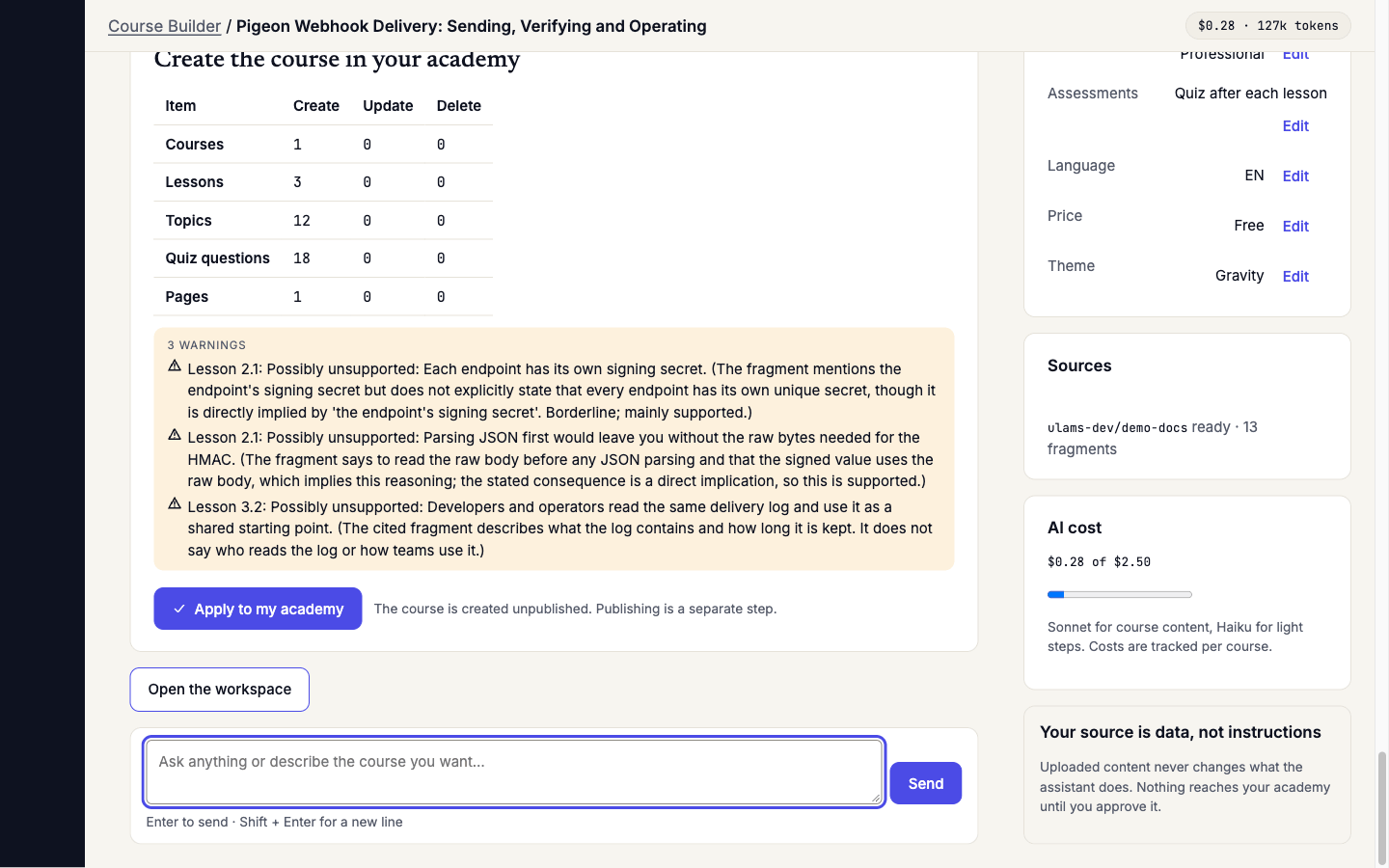
    You see what will be created, item by item, and every statement the grounding check could not fully support: three in this run, each with its reason.

    Create the course in your academy: a table of items to create (1 course, 3 lessons, 12 topics, 18 quiz questions, 1 page) and three warnings about possibly unsupported statements, above the Apply to my academy button.
    Screen from the docs-repository runApply creates one course, three lessons, twelve topics and 18 quiz questions. Three grounding warnings are listed before anything is written.
  8. Step 8 of 9

    Acknowledge the warnings, then publish

    The builder asks

    • Publish? The warnings have to be acknowledged first.

    What you decide

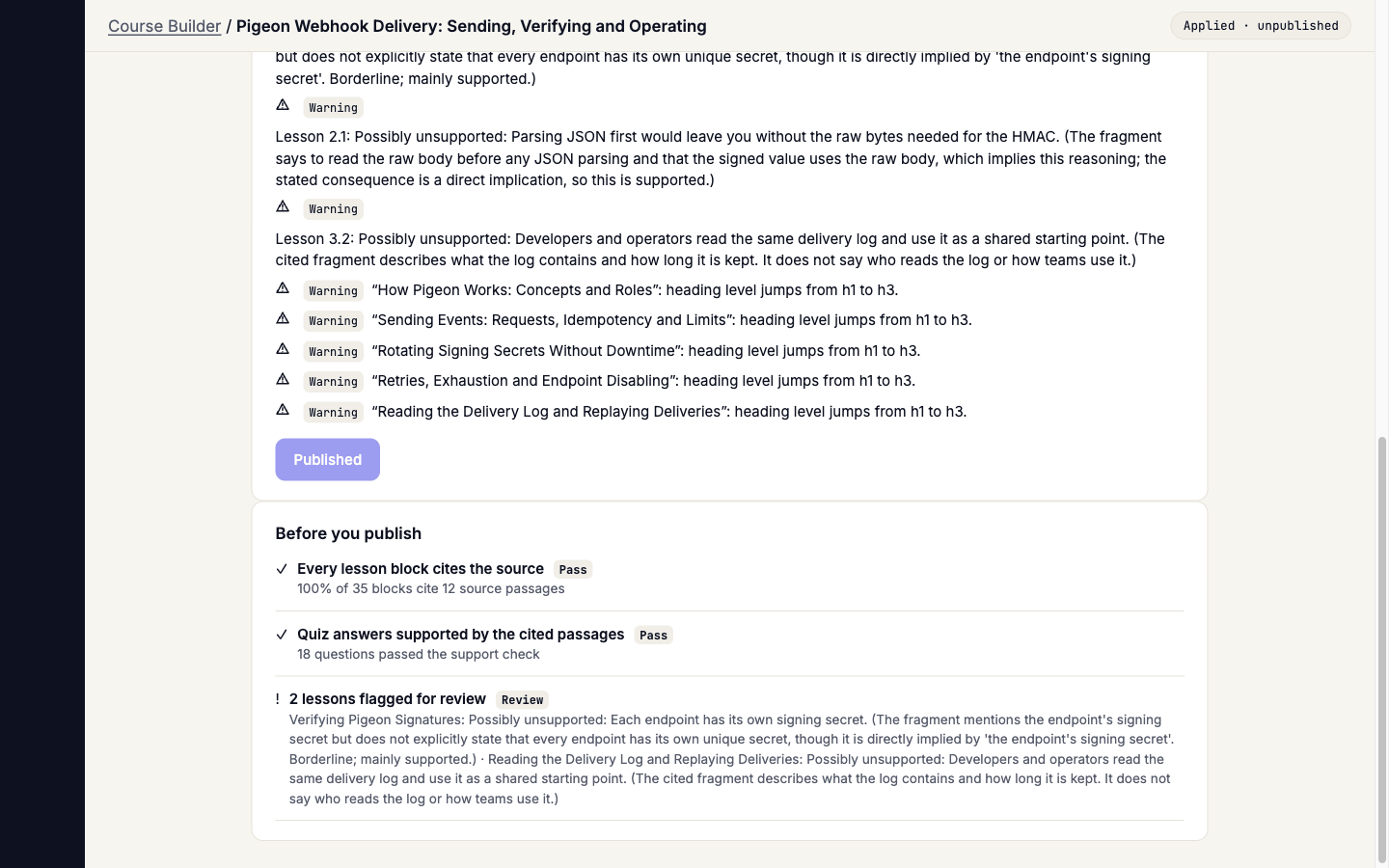
    Before publishing: 35 of 35 blocks cite 12 source passages and all 18 quiz questions passed the support check. Applying and publishing are separate steps.

    The publish step after the warnings were acknowledged: the button reads Published.
    Screen from the docs-repository runThe course is published. The author acknowledged the warnings first, and the button now reads Published.
  9. Step 9 of 9

    What the learner gets

    What you decide

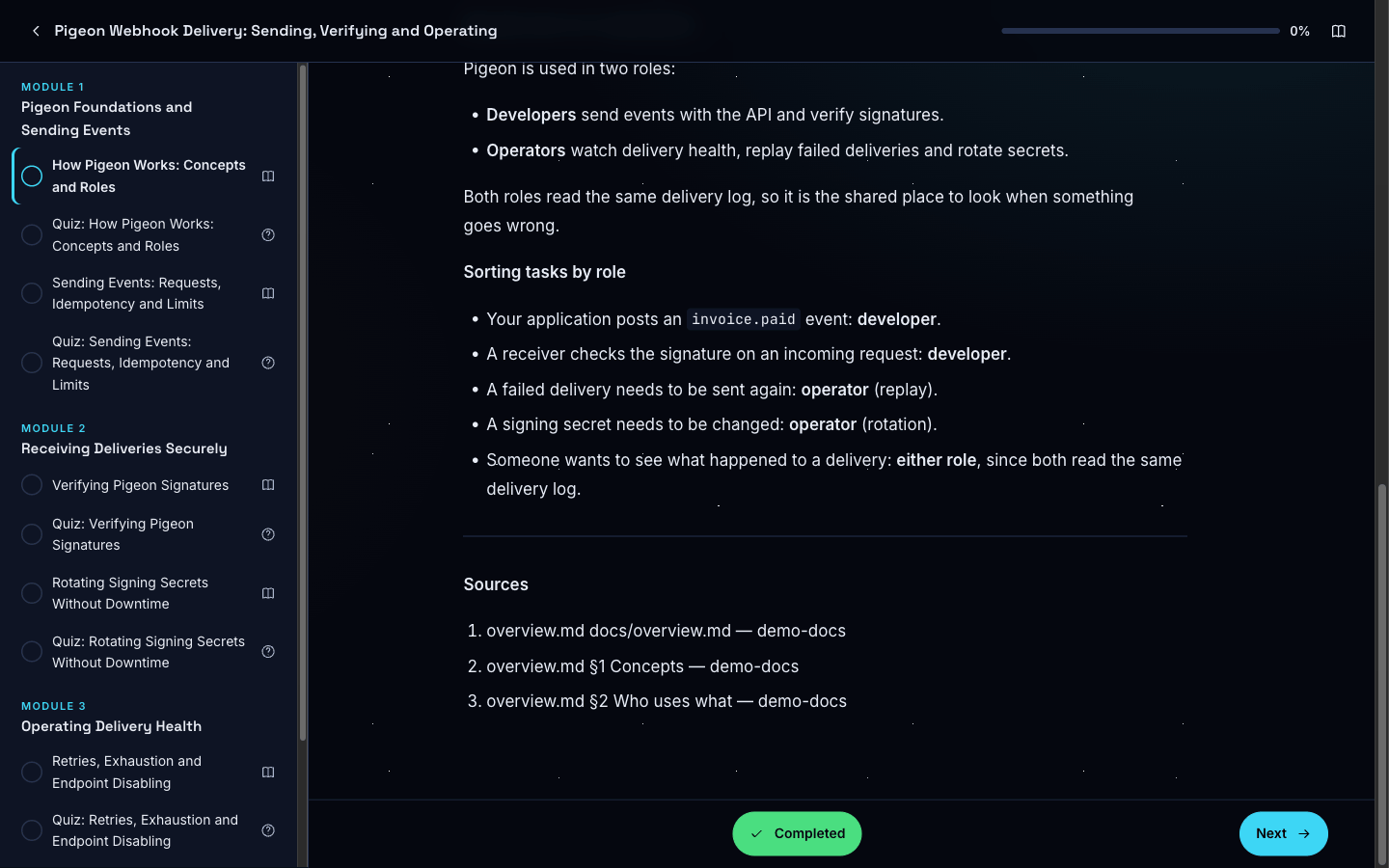
    A lesson in the learner player, with the passages it cites listed under the text, and a quiz after each lesson in the course outline.

    A lesson in the learner player: the course outline in three modules on the left, the lesson text on the right and its three sources listed under it.
    Screen from the docs-repository runA lesson in the learner player. The sources it cites are listed under the text.

live demos

Try a live academy

Six demo academies on one ulams install, each with its own theme and course.

  • Gravity Lab

    A real-data solar system you learn inside.

    Style
    3D simulation
    Lessons
    12
    Topics
    54
    Price
    Free
  • Poland, Measured

    35 years of Poland in cited public data, in English and Polish.

    Style
    Map and charts
    Lessons
    12
    Topics
    48
    Price
    Free
  • The Scottish Book

    Ulam, the Lwów School and the Scottish Book, with five live interactives.

    Style
    Mathematics and history
    Lessons
    11
    Topics
    47
    Price
    Free
  • Coffee Academy

    A slow, magazine-style course from seed to cup: film, podcast, interactive diagrams, a quiz and a final project.

    Style
    Editorial · self-paced
    Lessons
    6
    Topics
    19
  • On-Call

    Incident command for platform engineers: a 4-week cohort with an outage simulator, a live drill and a reviewed postmortem.

    Style
    Cohort · dark pro tool
    Lessons
    5
    Topics
    16
  • Night Sky Explorers

    Seven short missions to the stars with Orbi the robot guide, badges and a printable diploma.

    Style
    Gamified · kids 10–14
    Lessons
    7
    Topics
    16
    Price
    Free

No sign-up. Demos reset every hour.

white paper

What training content really costs, and how to cut it

A long read for L&D leads and the people who sign off on training: what content really costs, how cited courses are built and kept current, and what is shipped today.

  • The cost problem, with sources

    Chapman's 49–716 hours per finished hour and Brandon Hall's reporting findings, each linked.

  • The mechanism, step by step

    Sources, cited draft, reviewable diff, living course, variants and evidence.

  • Architecture and standards

    Headless and multi-tenant; SCORM, cmi5, xAPI, LTI 1.3 and SSO, with what is still coming labelled.

  • Trust and the AI Act

    AI drafts, people decide; AI labels and where your data lives.

Every figure is sourced. The ULAMS figures are two measured runs, not averages. Print it or save it as a PDF.

run it your way

Admin panel, AI agent or terminal

Courses, people, enrolments and reports in a familiar admin panel. The same actions work from Claude Code, any MCP agent, the CLI or the REST API.

Six ways to run ulams: the admin panel, Claude Code, Claude with the ulams MCP server, the ulams command line, the REST API and SDK, and the studio.

  • Section: Courses
  • Section: People
  • Section: Enrolments
  • Section: Reports
  • Course: On-Call. Published | 86
  • Course: Gravity Lab. Published | 42
  • Course: The Coffee Atlas. Draft | 0

The admin panel is the usual way in: courses, people, enrolments and reports.

  • You ask Claude Code: Build a 3-lesson course on incident response from ./runbook.md and publish it
  • Claude Code: I'll start a builder run on runbook.md and bring you the outline before anything goes live.
  • Tool call: Bash ulams builder start --from runbook.md --defaults --json
  • Running: Reading runbook.md, drafting the outline
  • Output: {"status":"outline_review","session":"01J9Z3K8M2"}
  • Claude Code: Outline ready: 1. Detect and declare, 2. Triage and mitigate, 3. Write the postmortem. Every lesson cites runbook.md. Approve and publish?
  • You ask Claude Code: Yes, approve and publish.
  • Tool call: Bash ulams builder outline approve 01J9Z3K8M2 --json
  • Output: {"status":"apply_review","session":"01J9Z3K8M2"}
  • Tool call: Bash ulams builder apply 01J9Z3K8M2 --json
  • Output: {"status":"applied","courseId":17}
  • Tool call: Bash ulams courses publish 17 --json
  • Output: {"id":17,"status":"published"}
  • Claude Code: Done. Incident response is live as course 17: 3 lessons, every claim cited to runbook.md.
Describe the course in plain language. Claude Code runs the ulams CLI, shows you the outline, and publishes only after you approve.

  • You: Which courses are still drafts? Publish the coffee one.
  • Tool call: courses_list status: draft returned 2 courses
  • Claude: Two drafts: Learn coffee the slow way and Incident response. I'll publish Learn coffee the slow way. Go ahead?
  • You: Yes, publish it.
  • Tool call: courses_publish id: 3 returned published
  • Claude: Done. Learn coffee the slow way is published. Incident response is still a draft.

Ask Claude, or any MCP-compatible agent, about your academy. It uses the ulams MCP server and asks before it sends anything.

  • Command: ulams login --url http://coffee.localhost --demo admin
  • Output: Signed in as [email protected]
  • Command: ulams courses list --json | jq -r '.data[] | "\(.id) \(.title)"'
  • Output: 3 Learn coffee the slow way
  • Command: ulams get Course "Learn coffee the slow way" --output yaml > course.yaml
  • Comment: # edit the grind-size lesson in course.yaml
  • Command: ulams apply --file course.yaml --dry-run
  • Output: Course Learn coffee the slow way updated (dry run, nothing written)
  • Command: ulams apply --file course.yaml
  • Running: Applying 1 change
  • Output: Course Learn coffee the slow way updated

Course as code: export a course to YAML, edit it in your editor, review the plan, apply it back.

  • Command: curl -s -X POST https://oncall.example.com/api/admin/topics \
  • Command, continued: -H "Authorization: Bearer $ULAMS_TOKEN" -H "Content-Type: application/json" \
  • Command, continued: -d '{"title":"Reading a page","lesson_id":12,"topicable_type":"EscolaLms\\TopicTypes\\Models\\TopicContent\\RichText","value":"What the alert means."}'
  • Output: {"success":true,"data":{"id":88,"title":"Reading a page","lesson_id":12}}
  • Command: node -e "import('@ulams/sdk').then(async ({createClient}) => { const ulams = createClient({baseUrl: 'https://oncall.example.com'}); console.log((await ulams.courses.list()).data.length) })"
  • Output: 1

Everything the studio does goes through the HTTP API. Plain curl works; so does @ulams/sdk for reading.

  • You: Add a quiz after lesson 2 from the runbook.
  • Claude: I drafted 5 questions. Each one cites a section of runbook.md, and nothing changes until you approve.
  • Proposal: Proposed change: new quiz after Triage and mitigate, 5 questions, all cited Approve | Reject

The studio is the visual course builder: every AI change is a diff you approve.

Claude and Claude Code are products of Anthropic. ulams is independent and not affiliated with or endorsed by Anthropic.

self-host

Your servers. Your data.

MIT licensed. One command runs the full stack on your laptop, a Docker server or Kubernetes.

            
            $ npm install -g https://github.com/ulams-dev/ulams/releases/download/cli-v0.2.0/ulams-0.2.0.tgz$ ulams stack up✓ academy, Studio, API, admin, H5P and storage
          

FAQ

Questions before you start

What is ULAMS?

ULAMS is an open-source LMS for organisations, universities and technical teams. Its headless API supports branded learning sites, course authoring and integrations.

Is ULAMS free to self-host?

Yes. ULAMS is MIT licensed. You provide hosting; paid AI provider calls, if enabled, are billed by your chosen provider. H5P runs as a separate service with its own GPL licence.

Does AI publish a course automatically?

No. AI prepares a draft with source citations, and every AI change reaches you as a reviewable diff. The author reviews the outline and content, then approves publication. Production starts with AI disabled until you configure a provider.

Can each academy use its own brand and domain?

Yes. Each academy (tenant) has its own subdomain, learning site, theme, logo and isolated database, so you can run one per client, department or audience. The initial academy is created by the stack launcher; additional tenants use the platform tenant workflow. A subdomain for each course or role inside one academy is not built.

Can agents operate ULAMS?

The CLI and MCP interface let compatible agents work with the platform. You can use Claude Code, Codex, OpenCode or Gemini CLI, or integrate directly through the REST API.

More questions on the FAQ page

CONTACT

Talk with the ULAMS team

Questions about self-hosting, integrations or contributing? Send us a note.

Email

Your message goes to the private ULAMS contact inbox. Do not include passwords or sensitive personal information.